Back to nationalgrid.com
Unlock the full potential of your smart meter
Your smart meter enables new tools and insights to help you stay in control of your energy use. Learn how to access your data, monitor energy use, and take advantage of features designed to support your energy goals.
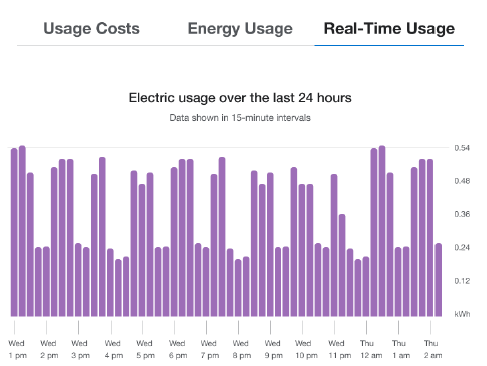
View electric use in 15-minute Intervals
See real-time electric use by appliance
Improved response and restoration if there’s a power outage
MyAccount Portal
Your smart meter unlocks new features within your MyAccount portal allowing you to:
- see how much electricity you’re using - every 15 minutes
- identify patterns, like which times of day see highest usage
- make inferences about what’s driving your electic bill
- discover opportunities to save electricity
As soon as your smart meter is installed, it’s connected and begins recording usage data. Typically, within 24-48 hours following installation, your usage data is available in your MyAccount portal.
In some instances, meter registration could be delayed up to 30 days, requiring us to estimate your bill during this transition period. This estimated usage will be replaced by actual usage as soon as the meter connectivity is restored.
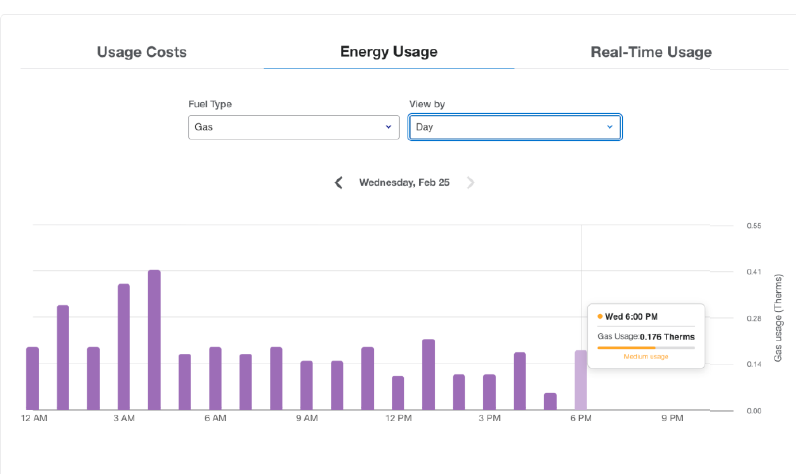
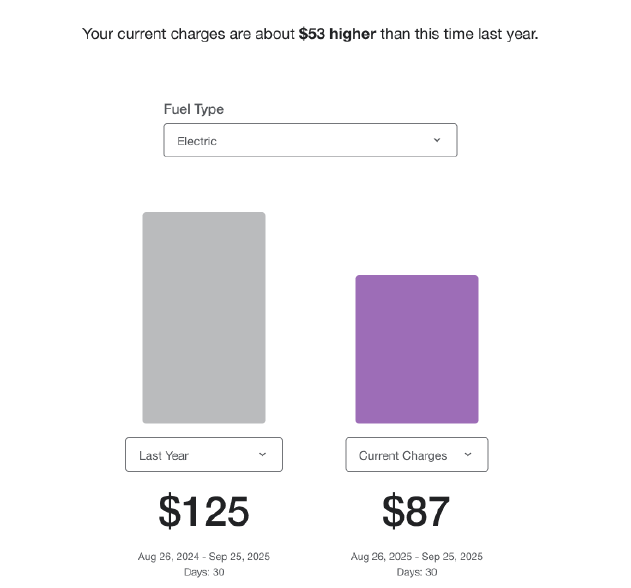
Step 1: Get started by logging into your MyAccount or creating a login to access MyAccount. You’ll need your National Grid account number to access the portal for the first time.
Step 2: Click the Menu drop-down on the left and select “Billing and Usage”
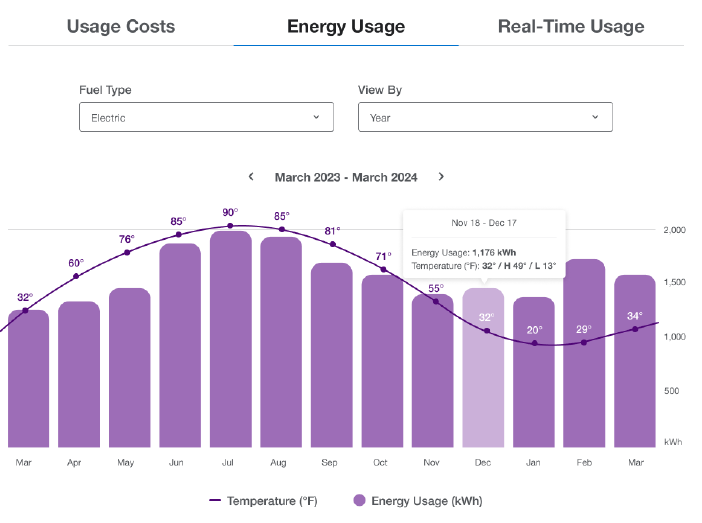
Step 3: Click “Energy Usage”
Step 4: Toggle between your usage costs, energy usage, and real time usage to explore these insights.
High-Usage Email Alert
Based on your historical energy use and the near real-time data from your smart meter, you can now receive automatic email alerts if your usage appears higher than usual. You’ll be notified when your energy use is trending at least 25% higher compared to the same billing period last year.
It’s a simple way to stay informed, catch potential issues early, and make small changes to help stay on track with your energy use and budget goals.
Sense® Home App
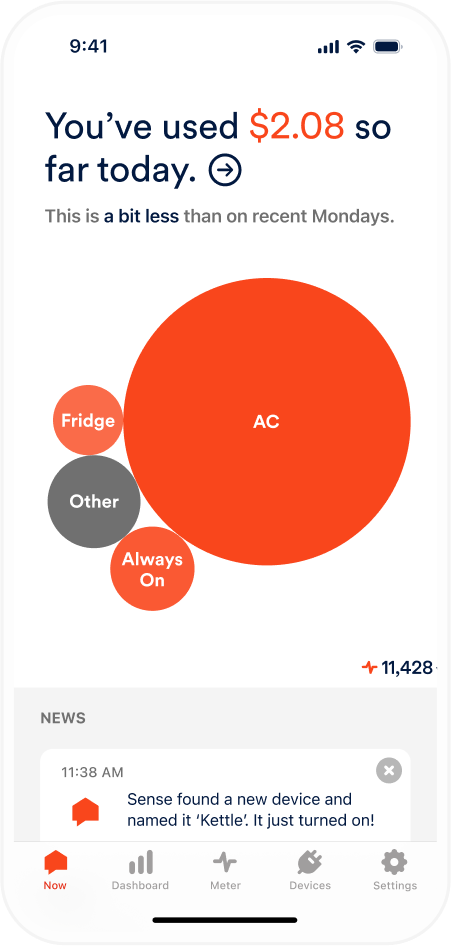
See your real-time electric use with the Sense® Home app.
The Sense Home app is a mobile app that you can download to your smartphone or tablet. It works with your smart meter to provide real-time electric use information — broken down by individual appliances — so you can see, understand, and manage how electricity is used in your household.
We offer access to Sense Home at no additional cost to residential customers with an electric smart meter. With the Sense Home app, you can:
- see what’s driving your electric use and when
- make more informed energy choices to help reduce electric use
- stay connected to your home from anywhere, anytime
Availability Note: The Sense® Home app is being rolled out over time as smart meters receive the latest software updates. We’ll notify you by email or text when your meter is ready to connect. Please note that setup requires a strong Wi‑Fi connection near your smart meter, which may be limited in some apartment or condo buildings. The Sense Home app is not currently available for solar customers.
The Sense Home app works with electric smart meters that have the latest software installed. These updates happen automatically, and customers will gain access as their meters are updated. When your smart meter is ready, you’ll receive an email or text notification letting you know you can connect. Getting started is simple:
- Download the Sense Home app
- Gather the following to help ensure a quick and easy setup:
- A valid email address
- A smartphone or tablet (with Android 9+ or iOS 16+)
- Your National Grid account number
- Your Wi-Fi name and password
- Create an account
- Link the Sense Home account to your National Grid account
- Connect to your home Wi-Fi network
- Complete the final setup check
- You’re connected!
Please note: A strong Wi‑Fi connection near your smart meter is required to use the Sense Home app. In some larger apartment or condo buildings, connectivity may be limited depending on meter location.
If your smart meter does not have the latest software, you will see an error message when trying to complete setup of the app. You will be notified once a software update is applied to your meter and you can complete app setup and connect.
Enhanced Outage Detection
Smart meters help us detect outages automatically and precisely - often before customers even call.
With traditional meters, we relied solely on customer reports to identify outages. Now, smart meters play a key role in providing our teams with outage alerts and system insights when power is lost. That means timely dispatching of crews, more efficient restoration, and a better experience for you.
Faster, Convenient Service Changes
Smart meters help make starting, stopping, or transferring electric service easier and more convenient. Because smart meters can securely communicate with National Grid remotely, many service connection requests can be completed without scheduling an in-person visit. This means faster service, greater flexibility, and less waiting when moving into a new home or managing changes to your account.
How to Read a Smart Meter
While we record your electric use on a regular basis, you can check your smart meter anytime to see how much electricity has been used.
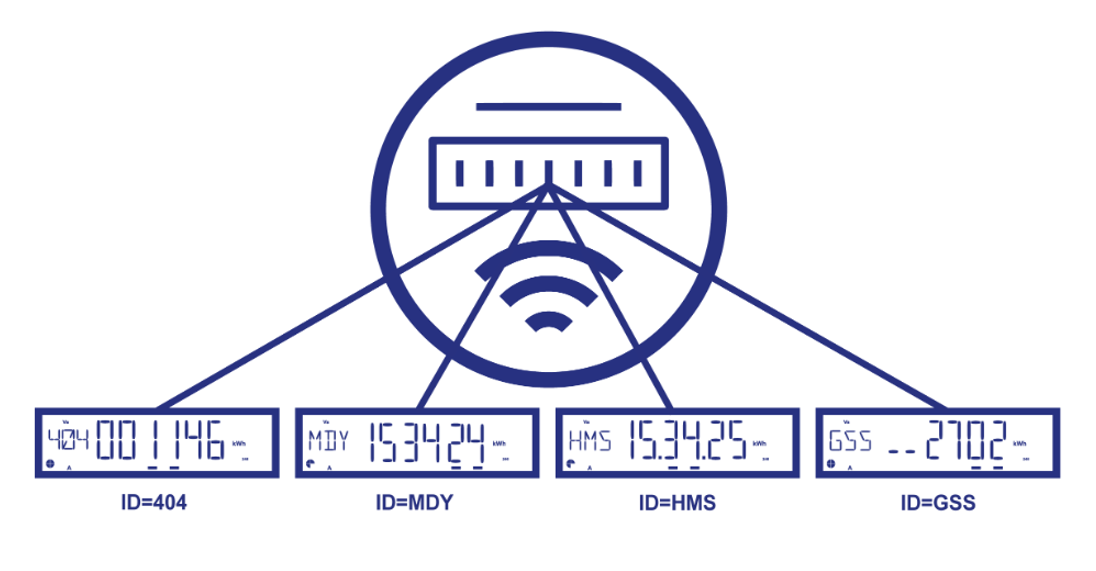
Smart meters show information on a digital display screen, which cycles through multiple displays to show different information. Look at the numbers or letters on the left to understand what is displayed:
- 404: Your total energy use (in kWh) since the meter was installed
- MDY: The current date (month/day/year)
- HMS: The current time (in military time)
- GSS: Used by the meter to check that it’s working properly